9/09/2007
SharePoint 2007 Links
Misc. SharePoint links from my favorites list...
SharePoint Services home:
http://www.microsoft.com/windowsserver2003/technologies/sharepoint/default.mspx
Home Page
http://www.microsoft.com/office/sharepoint
SP FAQ
http://www.microsoft.com/office/sharepoint/prodinfo/faq.mspx
WSS Hardware Requirements
http://technet.microsoft.com/en-us/windowsserver/sharepoint/bb684454.aspx
MOSS Hardware Requirements
http://technet2.microsoft.com/Office/en-us/library/4d88c402-24f2-449b-86a6-6e7afcfec0cd1033.mspx?mfr=true
Microsoft TechNet: Administrator's Guide for Windows SharePoint Services
http://technet2.microsoft.com/windowsserver/WSS/en/library
here's WSS 2.0:
http://www.microsoft.com/resources/documentation/wss/2/all/adminguide/en-us/default.mspx
MOSS - Office SharePoint Server Technical Library
http://technet.microsoft.com/en-us/sharepointserver/bb410856.aspx
Free downloadable book for WSS 3.0 from Microsoft:
http://technet2.microsoft.com/windowsserver/WSS/en/library/c2b1315b-80fb-4b9a-a83b-de9ce8337e991033.mspx
Tutorials
SharePoint Team Services Tutorial
http://www.microsoft.com/sharepoint/teamservices/techinfo/training/tutorial/default.asp
SharePoint sites:
http://www.msd2d.com/default_section.aspx?section=sharepoint
http://www.gotdotnet.com/team/sharepoint/
http://www.sharepointcustomization.com/default.aspx
http://msdn.microsoft.com/office/server/sps/default.aspx
http://wss.collutions.com/default.aspx
http://www.sharepointblogs.com/
Creating a custom theme:
http://www.graphicalwonder.com/2005/11/sharepoint_site_creation_stepb_6.html
Web parts and enhancements for SharePoint
Web Parts
SharePoint Products and Technologies Web Component Directory
http://www.microsoft.com/sharepoint/downloads/components/default.asp
http://www.google.com/search?hl=en&q=sharepoint+web+parts
http://www.corasworks.com/
Work Flow
http://www.google.com/search?hl=en&q=sharepoint+workflow
Microsoft Antigen for SharePoint (and Exchange)
http://www.microsoft.com/antigen/default.mspx
SharePoint Portal Pricing:
http://www.microsoft.com/office/sharepoint/howtobuy/default.mspx
SharePoint Scenarios (templates) Available for Download from Microsoft
http://www.microsoft.com/technet/prodtechnol/sppt/wssapps/default.mspx
Absence and Vacation Schedule
Board of Directors
Case Work Management
Change Management
Classroom Management
Competitive Intelligence
Discussion Database
Document Library
Employee Activities Site
Employee Timesheet and Scheduling
Employee Training
Event Coordination
Expense Reimbursement
Help Desk
HR Programs and Services
IT Developer Team Site
Legal Document Review Workflow
Loan Initiation Management
Marketing Campaigns
Meeting Management
New Product Development
Performance Review
Professional Svcs Contracts
Professional Svcs Site
Project Team Site
Public Official Activity
Public Relations Work Site
Publication Editorial Review
Recruiting Resource Center
Request for Proposal Management
Room and Equipment Reservation
NEW: Team Work Site
Travel Request
8/22/2007
SharePoint Search Resources
Several links for MOSS Search
Customizing and Extending the Microsoft Office SharePoint 2007 Search
http://msdn2.microsoft.com/en-us/library/bb608302.aspx
Long awaited 64-bit PDF IFilter finally available (but not from Adobe)
http://blogs.msdn.com/ifilter/archive/2007/05/10/long-awaited-64-bit-pdf-ifilter-finally-available.aspx
How Microsoft implemented SharePoint search for their sites...
Deploying and Supporting Enterprise Search
Technical White Paper
http://www.microsoft.com/technet/itshowcase/content/deployingsearchtwp.mspx
A sumary of the above:
http://blogs.msdn.com/joelo/archive/2007/08/16/new-search-indexing-whitepaper-from-ms-it-includes-best-practices-and-optimization.aspx
On-Demand Webcast -- TechNet Webcast: How Microsoft IT Manages Enterprise Search with SharePoint Server 2007 (audio also available as a podcast)
http://msevents.microsoft.com/CUI/WebCastEventDetails.aspx?culture=en-US&EventID=1032334379&CountryCode=US
Microsoft's lab results from testing various search hardware configurations:
Estimate performance and capacity requirements for search environments
http://technet2.microsoft.com/Office/en-us/library/5465aa2b-aec3-4b87-bce0-8601ff20615e1033.mspx?mfr=true
Configure a dedicated front-end Web server for crawling (Office SharePoint Server 2007)
http://technet2.microsoft.com/Office/en-us/library/0cf7b3cd-090a-4c5e-b2c1-6272584ba2b21033.mspx?mfr=true
8/09/2007
SharePoint: Adding hyperlinks to document libraries
Sometimes you have external content that you would like to make available from your document library without uploading a file. Examples include documents in other SharePoint sites or libraries, and even links to other web pages including SharePoint pages and external web sites.
Turns out SharePoint already has this built-in, just well hidden. There is a built-in Content Type called "Link to a Document". Just add this to your library and then just click the "New" dropdown and select "Link to a Document"! It will simply ask you for a document name and url. You can supply a URL to anything that starts with "http://", including both SharePoint documents and external web pages. It does not support a link to a network share such as "\\myfileserver\folder1\somedoc.doc".
- Display your library (Example: Shared Documents)
- Click Settings and Library Settings
- Click Advanced Settings
- Check "Allow management of content types" and then OK
- In the Settings page scroll down to Content Types and click "Add from existing site content types"
- Select "Link to a Document", click Add and then Click OK
- Go back to your library and click the New dropdown and select "Link to a Document"
- Enter a display name (Document Name) and the URL (must start with http://) and click OK
- Basic Page
- Web Part Page
- Dublin Core Columns (Do a web or wikipedia.com search for "Dublin Core")
- Picture
You can also add customized folders to the New dropdown. See here. Need to add custom columns / meta data to any of the above? Just create a new Content Type based on one of the above and add it to your library. See here.
.
8/08/2007
SQL Links
Misc SQL links from my favorites list...
SQL Injection links
http://www.spidynamics.com/whitepapers/WhitepaperSQLInjection.pdf
http://www.spidynamics.com/whitepapers/Blind_SQLInjection.pdf
http://www.imperva.com/application_defense_center/white_papers/blind_sql_server_injection.html
and more... http://www.google.com/search?hl=en%26q=sql%2Binjection%2Bwhite%2Bpaper
Links:
http://www.microsoft.com/sql/
http://www.sqldbatips.com/
http://www.sqlsecurity.com/
http://www.aspfaq.com/sql2005/
QA shortcut keys!
http://searchsqlserver.techtarget.com/ (or just http://searchsqlserver.com/)
http://www.microsoft.com/sql/community/default.mspx SQL Server Community (BLOGs etc)
http://www.google.com/advanced_group_search?q=group:microsoft.public.sqlserver.* Google News group search
More...
http://www.sqlteam.com/
http://sqlxml.org/
http://sqldev.net/
http://www.sqlpass.org/ Professional Association for SQL Server (Basic PASS Membership - FREE)
http://www.carlprothman.net/Default.aspx?tabid=81 (Connect strings!)
http://www.connectionstrings.com/
http://www.winnetmag.com/SQLServer/ SQL Server Magazine
• Password cracking tools for SQL Server: SearchSQLServer.com (May 9, 2006)
http://searchsqlserver.techtarget.com/tip/1,289483,sid87_gci1187282_tax301336,00.html?track=NL-416&ad=550187&adg=301324&bucket=ETA
http://www.sqldbatips.com/showarticle.asp?ID=46
SQL 2005 Service Manager
With the lack of an equivalent in SQL2005 for the SQL Server Service Manager that comes with SQL2000, I've decided to write one myself. It's behaviour should be familiar to you if you've used SQL2000.
Ten hacker tricks to exploit SQL Server systems
http://searchsqlserver.techtarget.com/tip/1,289483,sid87_gci1165052_tax301336,00.html?Offer=SQLwnha217
Reporting Services Scripter is a .NET Windows Forms application that enables scripting of all Microsoft SQL Server Reporting Services catalog items to aid in transferring them from one server to another. It can also be used to easily move items on mass from one Reporting Services folder to another on the same server. Depending on the scripting options chosen, Reporting Services Scripter can also transfer all catalog item properties such as Descriptions, History options, Execution options (including report specific and shared schedules) and server side report parameters
http://www.sqldbatips.com/showarticle.asp?ID=62
---
Counters (SQL 2000)
http://www.microsoft.com/technet/prodtechnol/sql/2000/maintain/ss2kidbp.mspx
SQL Server Best Practices
http://technet.microsoft.com/en-us/sqlserver/bb331794.aspx
Predeployment I/O Best Practices
http://www.microsoft.com/technet/prodtechnol/sql/bestpractice/pdpliobp.mspx
Troubleshooting Performance Problems in SQL Server 2005
http://www.microsoft.com/technet/prodtechnol/sql/2005/tsprfprb.mspx
SQL Server 2005 Waits and Queues
http://www.microsoft.com/technet/prodtechnol/sql/bestpractice/performance_tuning_waits_queues.mspx
Top 10 Performance Monitor counters
http://searchsqlserver.techtarget.com/tip/1,289483,sid87_gci1111751_tax301334,00.html
8/04/2007
SharePoint: How do to add a column (meta data) to SharePoint folders
Note: The following works for SharePoint 2007, 2010, 2013, 2016 and Office 365. SharePoint 2010 and later and Office 365 users should also take a look at Document Sets:
http://msdn.microsoft.com/en-us/library/ee559339.aspx
http://technet.microsoft.com/en-us/library/ff603637.aspx
"How do I add a column (meta data) to SharePoint folders?"
My first thought is to modify the Content Type named Folder, but it is "sealed". (Microsoft locked the door!) So I created a new Content Type based on Folder, added the custom column, added the content type to the library and magically I found my custom folder type in the New dropdown. Here's the steps:- Go to Site Actions, Site Settings
- Click Site Content Types
- Click Create
- Give the new content type a name such as "Enhanced Folder" or "Product Spec Folder"
- Set the parent content type group as Folder Content Types
- Set the parent content type to Folder
- Add the new content type to a Group. I put it back in the "Folder Content Types" group
- Click OK
- Scroll down to the columns section and click Add from new site column
- Name the column and set all the usual column options
- Repeat for any additional columns (Release Date, etc)
- Click OK
- Go to your document library
- Click Settings and Library Settings, or in 2010 click the Library ribbon tab and then click Library Settings
- Click Advanced and set Allow management of content types to Yes and click OK (this may already selected)
- Scroll down to Content Types and click Add from existing site content types and add your new folder content type
- Go to your document library and click the New dropdown, or the New button in the 2010 Document ribbon, and add your new folder!
- Go to the View dropdown and click Modify this view and add your new folder meta data columns (you will probably want to move them to just after the Name column)
SharePoint: How to search a Wiki
When displaying most SharePoint list and library pages the Search scope dropdown at the top of the page includes a "This List" entry. This
- First display the Wiki as a list:
- Click View All Site Content and then click the wiki or
- Scroll to the bottom of the Quick Launch area (below the Recycle Bin link) and click "View All Pages" or
- Display the wiki as usual and then click the wiki's name in the "crumb trail"
- Select "This List: wiki name" from the search scope dropdown
The following is a bit more formal and does not require the user to navigate to the wiki first...
You can setup search to point to any URL, inside or outside of SharePoint. Here's how I setup one for a Wiki:
(Search scopes can be setup from both Central Admin and your top level site - this example is from a site)
- Go to your wiki page and copy the URL, up to but not including "home.aspx" (http://maxsp2007/training/MyWiki)
- Go to Site Actions, Site Settings
- In the Site Collection Admin column click Search scopes
- Click New Scope
- Type the name or title to display in the search scope dropdown, optionally add a description
- Check "Search dropdown" and click OK.
- In the line for the new scope click Add Rules
- Click Web Address
- Paste your Wiki URL in the Folder box
- Click OK
- The scope will not be displayed in the search scope dropdown until the next full or incremental search index run.
.
8/02/2007
.Net Links - web resources
Some of the links I have collected for .Net - no particular order or grouping...
Why things were changed between 1.1 and 2.0 (very interesting blog) http://weblogs.asp.net/scottgu/archive/2005/08/21/423201.aspx
New in 3.0 http://download.microsoft.com/download/5/8/6/5868081c-68aa-40de-9a45-a3803d8134b8/csharp_3.0_specification.doc http://msdn2.microsoft.com/en-us/vstudio/aa700830.aspx http://msdn.microsoft.com/data/ref/linq/
.Net history (video) http://channel9.msdn.com/ShowPost.aspx?PostID=44084 http://channel9.msdn.com/ShowPost.aspx?PostID=44940
Dot Net Security Whitepaper: Improving Web Application Security: Threats and Countermeasures http://msdn.microsoft.com/library/default.asp?url=/library/en-us/dnnetsec/html/ThreatCounter.asp
Spelling checker add-in for Visual Studio 2005 http://weblogs.asp.net/scottgu/archive/2006/04/18/Spell-Checker-Plug_2D00_in-for-VS-2005-for-ASP.NET-and-HTML-Pages.aspx
2.0 Generics overview: http://msdn.microsoft.com/library/default.asp?url=/library/en-us/dnvs05/html/csharp_generics.asp
IIS Lockdown Tool http://www.microsoft.com/technet/security/tools/locktool.mspx
"Security Smack Down" http://www.devcity.net/PrintArticle.aspx?ArticleID=50
Defend Your Code with Top Ten Security Tips Every Developer Must Know http://msdn.microsoft.com/msdnmag/issues/02/09/SecurityTips/default.aspx
ASP.NET Security Overview http://support.microsoft.com/default.aspx?scid=kb;EN-US;Q306590
Ajax / Atlas article: http://msdn.microsoft.com/msdnmag/issues/06/07/AtlasAtLast/
Want to see what's in the ViewState collection? Go to this link and search for "ViewState decoder" http://pluralsight.com/blogs/fritz/archive/2004/07/01/472.aspx
Other languages for dotnet! (I count nearly 50, some with multiple sources) http://www.dotnetpowered.com/languages.aspx
Web Parts tutorial http://www.ondotnet.com/pub/a/dotnet/2005/05/23/webparts_1.html
Tutorial: Developing a templated control designer in ASP.NET 2.0 http://blogs.infosupport.com/wouterv/archive/2005/09/15/Developing-a-templated-control-designer-in-ASP.NET-2.0-_2800_5-parts_2900_.aspx
How to store the web part catalog in an XML file http://www.carlosag.net/Articles/WebParts/catalogPartSample.aspx Application Blocks, patterns and practices http://msdn.microsoft.com/practices/
2003 -> 2005 issues / solutions... Visual Studio 2005 Web Application Projects (Released May 8, 2006) http://msdn.microsoft.com/asp.net/reference/infrastructure/wap/default.aspx Update to the Web Project Conversion Wizard The Web Project Conversion Wizard in Visual Studio 2005 has been updated to handle newly discovered conversion issues. http://www.microsoft.com/downloads/details.aspx?familyid=7cecd652-fc04-4ef8-a28a-25c5006677d8&displaylang=en Upgrade from ASP.NET 1.x info http://msdn.microsoft.com/asp.net/reference/migration/upgrade/default.aspx
Memory in .NET - what goes where http://www.yoda.arachsys.com/csharp/memory.html ASP.NET 2.0 Security Practices at a Glance http://msdn.microsoft.com/library/default.asp?url=/library/en-us/dnpag2/html/PAGPractices0001.asp Newsgroups: (can be searched at http://groups.google.com) microsoft.public.dotnet microsoft.public.dotnet.academic.* microsoft.public.dotnet.csharp.general microsoft.public.dotnet.datatools microsoft.public.dotnet.distributed_apps microsoft.public.dotnet.faqs microsoft.public.dotnet.framework.* microsoft.public.dotnet.general microsoft.public.dotnet.internationalization microsoft.public.dotnet.jscript.general microsoft.public.dotnet.languages.* microsoft.public.dotnet.myservices microsoft.public.dotnet.samples microsoft.public.dotnet.scripting microsoft.public.dotnet.security microsoft.public.dotnet.vb.general microsoft.public.dotnet.vjsharp microsoft.public.dotnet.vsa microsoft.public.dotnet.xml Google Newsgroup searches list of all MS dotnet groups: http://groups.google.com/groups/dir?q=microsoft.public.dotnet start of a top level search: http://groups.google.com/groups?&as_ugroup=microsoft.public.dotnet.*
General Sites: Microsoft .NET http://www.microsoft.com/net/ DotNetSlackers: ASP.NET News For Lazy Developers http://www.dotnetslackers.com/ DotNetJunkies.com - Tutorials, news, sample code, user contributed code and web services directory http://www.dotnetjunkies.com/ GotDotNet: The Microsoft .NET Framework Community http://www.gotdotnet.com/ ASP.NET http://www.asp.net/ .NET Rocks! is a weekly Internet audio talk show for .NET Developers. http://www.dotnetrocks.com/ MSDN: ASP.NET - ASP and ASP.NET 2.0, as well at Atlas and Visual Web Developer http://msdn.microsoft.com/asp.net/ ASP.NET QuickStart Tutorials http://samples.gotdotnet.com/quickstart/aspplus/ 411 ASP.NET Directory http://www.411asp.net/ ASP.NET.4GuysFromRolla.com http://aspnet.4guysfromrolla.com/ 123aspx.com ASP.NET Resource Directory http://www.123aspx.com/
SQL Injection http://www.spidynamics.com/whitepapers/WhitepaperSQLInjection.pdf http://www.spidynamics.com/whitepapers/Blind_SQLInjection.pdf http://www.imperva.com/application_defense_center/white_papers/blind_sql_server_injection.html and more... http://www.google.com/search?hl=en&q=sql+injection+white+paper
8/01/2007
My certs...
After a while it seems you collect these like a model trains or spoons...
 _1350%5B4%5D.jpg "MCPD(rgb)_1350") _1347%5B4%5D.jpg "MCTS SP 2010 dev (rgb)_1347") _1349%5B4%5D.png "MCITP SP 2010(rgb)_1349") _1342%5B4%5D.png "MCTS SP2010 (rgb)_1342")        (and for completeness... Windows 95 and Windows for WorkGroups!)  |

7/19/2007
zzyy2
This is a test... please ignore!
All about Features!
Not really... Features are one of SharePoint's Swiss Army Knives, something for everybody...
So where to start? Here's a list of topics... the ones that are links are finished and the others will be done one of these days!
- Tips for editing Features
- The feature.xml file
- The elements.xml file
- more
- Features to add menu items to SharePoint
- Features to remove items from SharePoint
- Features to add custom controls (using SharePoint Delagate controls)
- Features to run custom .Net code
Tips for editing Features
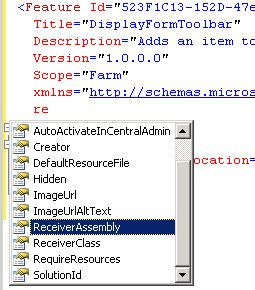
Features are defined using XML. You can use any editor, but likely candidates include Notepad, Visual Studio, SharePoint Designer and any other XML editor. To edit XML with some form of Intellisense requires an XML schema. SharePoint supplies one named WSS.XSD and it can be found in C:\Program Files\Common Files\Microsoft Shared\web server extensions\12\TEMPLATE\XML.
In most XML editors you can list the schema in the XML tag:
<Feature xmlns="http://schemas.microsoft.com/sharepoint/">
</Feature>
From that point on you should get syntex help from your XML editor.
In Visual Studio you can do the above, or in the Properties panel for the XML file you can enter the path to the schema file in the Schemas property.
<?xml version="1.0" encoding="utf-8" ?>
<Feature Id="523F1C13-152D-47e7-8E60-7E2EB93C2EA0"
Title="DisplayFormToolbar"
Description="Adds an item to DisplayFormToolbar"
Version="1.0.0.0"
Scope="Farm"
xmlns="http://schemas.microsoft.com/sharepoint/"
>
<ElementManifests>
<ElementManifest Location="Elements.xml" />
</ElementManifests>
</Feature>
<?xml version="1.0" encoding="utf-8" ?>
<Feature Id="523F1C13-152D-47e7-8E60-7E2EB93C2EA0"
Title="DisplayFormToolbar"
Description="Adds an item to DisplayFormToolbar"
Version="1.0.0.0"
Scope="Farm"
xmlns="http://schemas.microsoft.com/sharepoint/"
>
<ElementManifests>
<ElementManifest Location="Elements.xml" />
</ElementManifests>
</Feature>
Subscribe to:
Posts (Atom)